로컬 캐시 구현하기
의존성, 이거랑 밑에 있는 EhCache
    // 이 안에 caffeineCacheManager가 들어있음
    implementation 'org.springframework.boot:spring-boot-starter-cache'
    //caffeine
    implementation 'com.github.ben-manes.caffeine:caffeine'
- 로컬 캐시(Local Cache)의 개념, 필요성
- Spring에서 사용할 수 있는 다양한 로컬 캐시 구현체
- ConcurrentMapCacheManager, Caffeine Cache, EnCache의 구조와 동작 방식
- 각 캐시 구현체의 장단점 분석, 적절한 선택 기준??
- 실무에서 로컬 캐시 적용하고 테스트하는법
로컬 캐시(Local Cache)
애플리케이션 서버의 메모리 내부에 저장되는 캐시
네트워크를 거치지 않고 내부에서 직접 데이터를 가져오기 때문에, 조회 속도가 매우 빠름
하지만, 각 서버 인스턴스마다 별도의 캐시가 존재하므로 다중 서버 환경에서는 데이터 일관성이 보장되지 않을 수 있음
따라서 로컬 캐시는 단일 서버 애플리케이션 또는 읽기 중심 서비스에 적합하다.
1. 로컬 캐시의 기본 동작 구조

* 캐시를 먼저 확인하고, 존재하지 않는다면 실제 데이터 소스(DB / API)에서 조회 후 캐시에 저장합니다.
* 이후 동일한 요청이 들어오면 메모리에서 즉시 응답을 반환함
2. 로컬 캐시의 장단점
| 구분 | 장점 | 단점 |
| 장점 | 매우 빠른 접근 속도 | 네트워크의 지연이 없음 |
| 단점 | 서버별 데이터 불일치 가능 | 메모리 과다 사용 위험 |
* 로컬 캐시는 단일 인스턴스 환경에서 빠른 응답 속도를 위한 캐싱 솔루션으로 적합하지만, 분산 환경에서는 Redis와 같은 중앙 집중형 캐시가 필요하다.
ConcurrentMapCacheManager
Spring Boot에서 기본적으로 제공하는 로컬 캐시 구현체
별도 라이브러리 없이 간단히 사용할 수 있으며, 내부적으로 ConcurrentHashMap을 기반으로 작동한다
1. 기본 설정
Spring Boot에서 @EnableCaching을 활성화하면 자동으로 ConcurrentMapCacheManager가 등록됨
import org.springframework.cache.annotation.EnableCaching;
import org.springframework.context.annotation.Configuration;

@Configuration
@EnableCaching // 별도의 Bean 정의가 없으면, ConcurrentMapCacheManager가 기본적으로 사용됨
public class CacheConfig {
}
    @Cacheable(value = "userCache", key = "@keyUtil.createKey('USER', #id)")
    public User getUser(String name, Long id) {
        System.out.println("DB에서 사용자 정보를 조회함");
        User user = new User(id, name, 11);
        return user;
    }
* ConcurrentMapCacheManager는 내부적으로 ConcurrentHashMap을 사용하여 스레드 안전성을 보장함
* TTL(만료 시간), 캐시 크기 제한은 없으니 주의
2. 실행 흐름
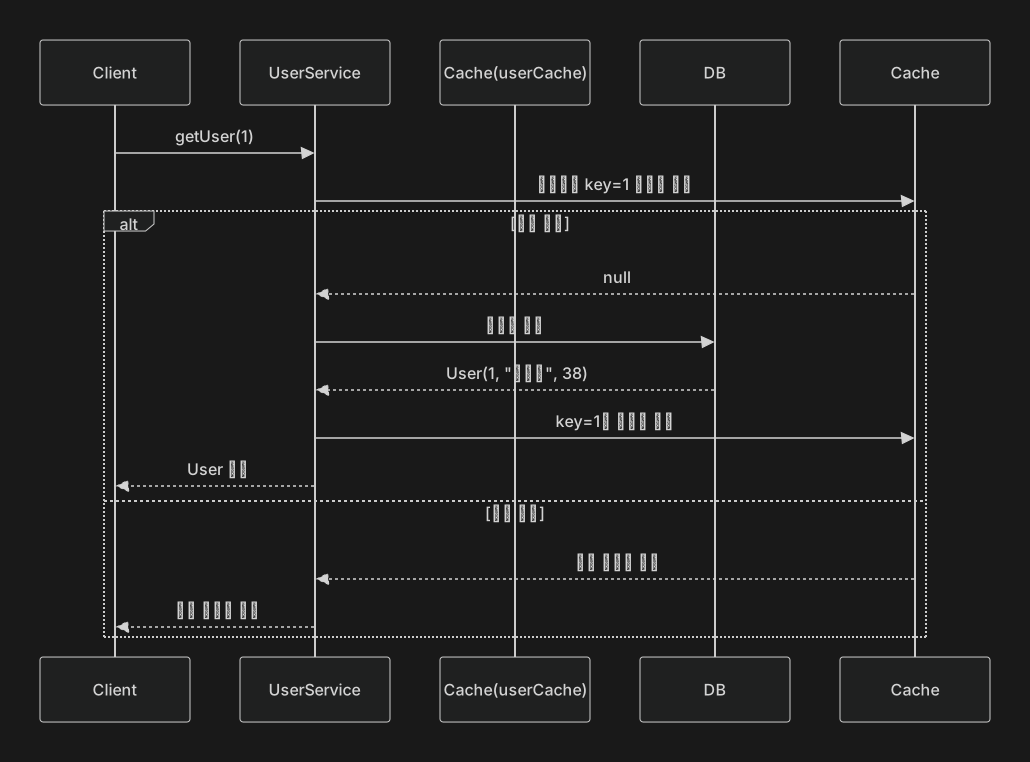
Client가 getUser 호출 - > Cache에서 key = 1에 대한 데이터 조회
- > 캐시가 있으면 캐시 데이터를 바로 반환
- > 캐시가 없으면 메서드를 실행한 뒤 결과값을 캐시에 저장하고 반환함
3. 주의점
| 구분 | 설명 |
| TTL(만료 시간) | 만료시간이 없음. 데이터가 오래되어도 메모리에 계속 남아있음 |
| 크기 제한 | 크기제한도 없음. 데이터가 무한히 쌓일 수 있음 |
| 스레드 안전성 | ConcurrentHashMap 기반으로 안전함 |
| 사용 용도 | 테스트용, 단일 서버 캐싱용 |
* 로컬 캐시로서 기능이 잘 구현되어있어도 운영 환경에서 사용하기에는 기능이 단순할 수 있으므로 Caffeine, EnCache같은 고급 캐시를 사용하는게 권장된다고 한다.
4. 개선 예시 - 명시적 Bean 등록
명시적으로 CacheManager를 Bean으로 등록한다면 IDE나 로그 상에서도 캐시 구성 상태를 더욱 명확하게 확인할 수 있음
import org.springframework.cache.CacheManager;
import org.springframework.cache.annotation.EnableCaching;
import org.springframework.cache.concurrent.ConcurrentMapCacheManager;
import org.springframework.context.annotation.Bean;
import org.springframework.context.annotation.Configuration;

@Configuration
@EnableCaching // 별도의 Bean 정의가 없으면, ConcurrentMapCacheManager가 기본적으로 사용됨
public class CacheConfig {

    @Bean
    public CacheManager cacheManager() {
        return new ConcurrentMapCacheManager("userCache");
    }
}
5. 개선 예시 - Caffeine으로 교체하기
import com.github.benmanes.caffeine.cache.Caffeine;
import org.springframework.cache.CacheManager;
import org.springframework.cache.annotation.EnableCaching;
import org.springframework.cache.caffeine.CaffeineCacheManager;
import org.springframework.context.annotation.Bean;
import org.springframework.context.annotation.Configuration;

import java.util.concurrent.TimeUnit;

@Configuration
@EnableCaching // 별도의 Bean 정의가 없으면, ConcurrentMapCacheManager가 기본적으로 사용됨
public class CacheConfig {

    @Bean
    public CacheManager caffeineCacheManager() {
        CaffeineCacheManager cacheManager = new CaffeineCacheManager("userCache");
        cacheManager.setCaffeine(Caffeine.newBuilder()
                .maximumSize(1000)
                .expireAfterWrite(10, TimeUnit.MINUTES));
        return cacheManager;
    }
}
* 위 ConcurrentMapCacheManager, CaffeineCacheManager의 차이점 요약
| 항목 | ConcurrentMapCacheManager | CaffeineCacheManager |
| TTL 지원 | 없음 | 지원(expireAfterWrite 메서드 등) |
| 캐시 크기 제한 | 없음 | maximumSize 설정 가능 |
| 통계 수집 | 없음 | recordStats() 메서드 지원 |
| 적합한 환경 | 테스트용 | 실무 서비스용 |
Caffeine Cache
Caffeine은 Google의 Guava Cache를 대체하기 위해 만들어진 고성능 인메모리 캐시 라이브러리임
ConcurrentMapCacheManager보다 다양한 기능(만료 정책, 캐시 크기 제한, 통계 수집 등)을 제공하고 있음
1. 의존성 추가
build.gradle
    //caffeine
    implementation 'com.github.ben-manes.caffeine:caffeine:3.1.8'
2. 설정 및 사용 예시
CacheConfig.java
import com.github.benmanes.caffeine.cache.Caffeine;
import org.springframework.cache.CacheManager;
import org.springframework.cache.annotation.EnableCaching;
import org.springframework.cache.caffeine.CaffeineCacheManager;
import org.springframework.context.annotation.Bean;
import org.springframework.context.annotation.Configuration;

import java.util.concurrent.TimeUnit;

@Configuration
@EnableCaching // 별도의 Bean 정의가 없으면, ConcurrentMapCacheManager가 기본적으로 사용됨
public class CacheConfig {

    @Bean
    public CacheManager caffeineCacheManager() {
        CaffeineCacheManager cacheManager = new CaffeineCacheManager("userCache");
        cacheManager.setCaffeine(Caffeine.newBuilder()
                .maximumSize(1000) // 최대 1000개의 항목을 저장할 수 있음
                .expireAfterWrite(10, TimeUnit.MINUTES) // 쓰기 후 10분 뒤 만료됨
                .recordStats()); // 통계 수집 활성화
        return cacheManager;
    }
}
캐시 사용 예시
변경없이 쓰면 되는것 같다
    @Cacheable(value = "userCache", key = "@keyUtil.createKey('USER', #id)")
    public User getUser(String name, Long id) {
        System.out.println("DB에서 사용자 정보를 조회함");
        User user = new User(id, name, 11);
        return user;
    }
3. Caffeine의 주요 기능들
| 기능 | 설명 |
| 만료 정책 | expireAfterWrite, expireAfterAccess 등 지원 |
| 크기 제한 | maximumSize()로 항목 수 조절 가능 |
| 통계 수집 | recordStats()로 hit / miss 비율을 추적 |
| 성능 | ConcurrentMapCache보다 약 3 ~ 5배 빠름 |
| 사용 용도 | 실시간 데이터 캐싱, 조회 빈도 높은 데이터 |
팁
* 캐시 크기와 만료 정책을 반드시 지정해야 메모리 누수를 방지할 수 있음
* recordStats()로 캐시 성능을 모니터링하면, 적중률 개선에 도움이 됨
* 단일 인스턴스 환경에서 가장 많이 사용되는 캐시 구현체임
EhCache
EhCache는 Java 진영에서 오래된 캐시 솔루션으로, 디스크 저장 및 클러스터링 기능까지 지원하고 있다
Spring Boot와의 통합도 간단하며, XML 또는 Java Config 방식으로 설정할 수 있음
1. 의존성 추가
build.gradle
    // EhCache
    implementation 'org.ehcache:ehcache:3.10.8'
2. XML 설정 예시 (ehcache.xml)
src/main/resources/ehcache.xml
<config xmlns:xsi='<http://www.w3.org/2001/XMLSchema-instance>'
        xmlns='<http://www.ehcache.org/v3>'
        xsi:schemaLocation='<http://www.ehcache.org/v3> <http://www.ehcache.org/schema/ehcache-core.xsd>'> <!-- config -->
    <cache alias='userCache'>
        <heap unit='entries'>1000</heap> <!-- 최대 1000개 항목 -->
        <expiry>
            <ttl unit='minutes'>10</ttl> <!-- 10분 후 만료됨 -->
        </expiry>
    </cache>
</config>
3. Spring 통합 설정
import org.springframework.boot.autoconfigure.cache.JCacheManagerCustomizer;
import org.springframework.cache.annotation.EnableCaching;
import org.springframework.context.annotation.Configuration;

import javax.cache.configuration.MutableConfiguration;
import javax.cache.expiry.CreatedExpiryPolicy;
import javax.cache.expiry.Duration;

@Configuration
@EnableCaching // 별도의 Bean 정의가 없으면, ConcurrentMapCacheManager가 기본적으로 사용됨
public class CacheConfig {

    public JCacheManagerCustomizer cacheManagerCustomizer() {
        return cacheManager -> cacheManager.createCache("userCache",
                new MutableConfiguration<>()
                        .setExpiryPolicyFactory(CreatedExpiryPolicy.factoryOf(Duration.TEN_MINUTES))
                        .setStoreByValue(false)
                        .setStatisticsEnabled(true));
    }
}
4. EhCache 특징 요약
| 항목 | 설명 |
| 저장 매체 | 메모리 + 디스크(선택적) |
| 만료 정책 | TTL, TTI(Time To Idle) 지원 |
| 클러스터링 | 다중 노드간 동기화 가능 |
| 적합한 환경 | 대규모 데이터 캐싱, 서버간 데이터 공유 등 |
팁
* 로컬 캐시이지만, 디스크 기반 스왑 기능으로 메모리 부담을 줄일 수 있음
* 다중 서버 간 동기화 옵션을 활성화하면 Redis 대체로도 활용이 가능하지만, 설정 복잡도가 높다고 한다
* XML 설정보다 Java Config 방식이 유지보수에 유리하다고 함. XML 써보니 알겠다.
정리
| 캐시 구현체 | 특징 | 적합한 환경 |
| ConcurrentMapCache | 단순한 메모리 캐시, 있는게 없음 | 테스트, 단일 서버 |
| Caffeine Cache | 만료 정책 / 통계 / 크기 제한 지원 | 실무 서비스, 빠른 조회 캐싱 |
| EhCache (EnCache 아님) | 디스크 저장, 클러스터링 가능 | 대규모, 장기 캐시 필요 환경 |
'Spring Boot > Cache' 카테고리의 다른 글
| 로컬 캐시 구현과 최적화 : 로컬 캐시 성능 측정 (0) | 2026.01.12 |
|---|---|
| 로컬 캐시 구현과 최적화 : 로컬 캐시 구성 최적화 (0) | 2026.01.12 |
| Spring Cache 기본 사용 : SpEL을 활용한 동적 캐시 키 (0) | 2026.01.10 |
| Spring Cache 기본 사용 : Spring Cache 활성화 및 주요 캐시 애너테이션 (0) | 2026.01.10 |
| Spring Cache 추상화 : Spring Boot 캐시 자동 설정 (0) | 2026.01.09 |


