이 글에 작성되는 예제들은 MVC(Servlet) 기반을 토대로 작성되었다. 애초에 리액티브에서는 정상적으로 사용할 수 없다
import조차 되지 않을것임
implementation 'org.springframework.boot:spring-boot-starter-web'
implementation 'org.springframework.boot:spring-boot-starter-security'
이거 2개로 돌아간다
핵심적인 포인트
- UsernamePasswordAuthenticationFilter 는 클라이언트로부터 전달받은 Username과 Password를
Spring Security가 인증 프로세스에서 이용할 수 있도록 UsernamePasswordAuthenticationToken을 생성한다 - AbstractAuthenticationProcessingFilter 는 HTTP 기반 인증 요청을 처리하지만
실질적인 인증 시도는 하위 클래스에게 맡기고, 인증에 성공하면 인증된 사용자의 정보를 SecurityContext에 저장하는 역할을 한다 - Authentication은 Spring Security에서의 인증 자체를 표현하는 인터페이스이다
- AuthenticationManager는 이름 그대로 인증 처리를 총괄하는 매니저 역할을 하는 인터페이스이며
인증을 위한 실질적인 관리는 AuthenticationManager를 구현하는 구현 클래스를 통해 이루어진다 - ProviderManager는 이름에서 유추하듯 AuthenticationProvider를 관리하고
AuthenticationProvider에게 인증 처리를 위임하는 역할을 한다 - AuthenticationProvider는 AuthenticationManager 로부터 인증 처리를 위임받아 실질적인 인증 수행을 담당하는 컴포넌트임
- UserDetails는
데이터베이스 등의 저장소에 저장된 사용자의 Username과 사용자의 자격을 증명해주는 크리덴셜인 Password
그리고 사용자의 권한 정보를 포함하는 컴포넌트이며
AuthenticationProvider는 UserDetails를 이용해서 자격 증명을 수행한다 - UserDetailsService는 UserDetails를 로드(load) 하는 핵심 인터페이스이다
- SecurityContext는 인증된 Authentication 객체를 저장하는 컴포넌트이고
SecurityContextHolder는 SecurityContext를 관리하는 역할을 담당한다
- SecurityContextHolder의 역할과 ThreadLocal 기반 동작 원리
- SecurityContext의 개념과 Authentication 객체 관리 방식
- Authentication 객체가 어떤 구조를 가지며, 인증 상태를 어떻게 표현하는가
- 전략 패턴, 권한 계층 구조 등 설계적 아이디어가 적용되는 방식

UsernamePasswordAuthenticationFilter
얘는 인증을 하지 않는다
로그인 요청을 Authentication 객체로 바꿔서 AuthenticationManager에게 전달하는 역할임
사용자의 로그인 request를 제일 먼저 만나는 컴포넌트가 Filter Chain의 UsernamePasswordAuthenticationFilter임
일반적으로 로그인 폼에서 제출되는 Username과 Password를 통한 인증을 처리하는 Filter임
클라이언트로부터 전달받은 Username과 Password를 Spring Security가 인증 프로세스에서 이용할 수 있도록
UsernamePasswordAuthenticationToken을 생성한다
간단하게 구현해본 UsernamePasswordAuthenticationFilter
Security에 기본적으로 구현되어 있으나 한번 구현해봤다
package org.springframework.security.web.authentication;
여기에 있음
import jakarta.servlet.ServletException;
import jakarta.servlet.http.HttpServletRequest;
import jakarta.servlet.http.HttpServletResponse;
import org.springframework.security.authentication.AuthenticationManager;
import org.springframework.security.authentication.AuthenticationServiceException;
import org.springframework.security.authentication.UsernamePasswordAuthenticationToken;
import org.springframework.security.core.Authentication;
import org.springframework.security.core.AuthenticationException;
import org.springframework.security.web.authentication.AbstractAuthenticationProcessingFilter;
import org.springframework.security.web.util.matcher.AntPathRequestMatcher;

import java.io.IOException;

public class UsernamePasswordAuthenticationFilter extends AbstractAuthenticationProcessingFilter { // (1)

    public static final String SPRING_SECURITY_FORM_USERNAME_KEY = "username"; // (2)
    public static final String SPRING_SECURITY_FORM_PASSWORD_KEY = "password"; // (3)

    // 더이상 사용되지 않음
    private static final AntPathRequestMatcher DEFAULT_ANT_PATH_REQUEST_MATCHER =
            new AntPathRequestMatcher("/login", "POST"); // (4)
    private boolean postOnly = true;

    public UsernamePasswordAuthenticationFilter(AuthenticationManager authenticationManager) {
        super(DEFAULT_ANT_PATH_REQUEST_MATCHER, authenticationManager); // (5)
    }

    @Override
    public Authentication attemptAuthentication(HttpServletRequest request,
                                                HttpServletResponse response)
            throws AuthenticationException, IOException, ServletException {

        // (6-1)
        if(this.postOnly && !request.getMethod().equals("POST")) {
            throw new AuthenticationServiceException("Authentication method not supported : " + request.getMethod());
        }

        String username = obtainUsername(request);
        username = username != null ? username.trim() : "";

        String password = obtatinPassword(request);
        password = password != null ? password : "";

        // (6-2)
        UsernamePasswordAuthenticationToken authRequest =
                new UsernamePasswordAuthenticationToken(username, password);

        setDetails(request, authRequest);

        return this.getAuthenticationManager().authenticate(authRequest); // (6-3)
    }

    protected String obtainUsername(HttpServletRequest request) {
        return request.getParameter(SPRING_SECURITY_FORM_USERNAME_KEY);
    }

    protected String obtatinPassword(HttpServletRequest request) {
        return request.getParameter(SPRING_SECURITY_FORM_PASSWORD_KEY);
    }

    protected void setDetails(HttpServletRequest request,
                              UsernamePasswordAuthenticationToken authRequest) {
        authRequest.setDetails(this.authenticationDetailsSource.buildDetails(request));
    }
}
UsernamePasswordAuthenticationFilter 클래스
public class UsernamePasswordAuthenticationFilter extends AbstractAuthenticationProcessingFilter { // (1)- UsernamePasswordAuthenticationFilter는 AbstractAuthenticationProcessingFilter를 상속한다
UsernamePasswordAuthenticationFilter의 클래스 이름은 Filter로 끝나지만,
클래스 안에 doFilter() 메서드는 존재하지 않는다.
Filter 역할을 하기 위해선 Filter() 메서드 형태로 구현해둔 후 필터링을 진행해야 하는데,
이 doFilter() 메서드는 AbstractAuthenticationProcessingFilter 클래스가 포함하고 있다
결과적으로 사용자의 로그인 HttpServletRequest 형태로 request를 제일 먼저 전달받는 클래스는
UsernamePasswordAuthenticationFilter의 상위 클래스인 AbstractAuthenticationProcessingFilter 클래스임
    public static final String SPRING_SECURITY_FORM_USERNAME_KEY = "username"; // (2)
public static final String SPRING_SECURITY_FORM_PASSWORD_KEY = "password"; // (3)- 클라이언트의 로그인 폼을 통해 전송되는 request 파라미터의 디폴트 name값은 username과 password이다
    // 더이상 사용되지 않음
    private static final AntPathRequestMatcher DEFAULT_ANT_PATH_REQUEST_MATCHER =
            new AntPathRequestMatcher("/login", "POST"); // (4)

    public UsernamePasswordAuthenticationFilter(AuthenticationManager authenticationManager) {
        super(DEFAULT_ANT_PATH_REQUEST_MATCHER, authenticationManager); // (5)
}- AntPathRequestMatcher 는 클라이언트의 URL에 매치되는 매처이다
위 AntPathRequestMatcher 생성자를 통해 클라이언트의 URL이 "/login"이고,
HTTP Method가 POST일 경우 매치될 것이라는 사실을 알 수 있다
위에서 생성되는 AntPathRequestMatcher의 객체는 (5)와 같이 상위 클래스인 AbstractAuthenticationProcessingFilter 클래스에 전달되어 Filter가 구체적인 작업을 수행할지, 특별한 작업 없이 다른 Filter를 호출할지 결정하는 데 사용된다
    @Override
    public Authentication attemptAuthentication(HttpServletRequest request,
                                                HttpServletResponse response)
            throws AuthenticationException, IOException, ServletException {

        // (6-1)
        if(this.postOnly && !request.getMethod().equals("POST")) {
            throw new AuthenticationServiceException("Authentication method not supported : " + request.getMethod());
        }

        String username = obtainUsername(request);
        username = username != null ? username.trim() : "";

        String password = obtatinPassword(request);
        password = password != null ? password : "";

        // (6-2)
        UsernamePasswordAuthenticationToken authRequest =
                new UsernamePasswordAuthenticationToken(username, password);

        setDetails(request, authRequest);

        return this.getAuthenticationManager().authenticate(authRequest); // (6-3)
}- 오버라이드한 attemptAuthentication 메서드는 클라이언트에서 전달한 username, password 정보를 이용해서 인증을 시도한다
attemptAuthentication() 메서드는 상위 클래스인 AbstractAuthenticationProcessingFilter의 doFilter() 메서드에서 호출되는데, Filter에서 어떤 처리를 하는 시작점은 doFilter() 라는 점이 중요하다
- (6-1)에서 HTTP Method가 POST라면 (this.postOnly는 항상 true이다) Exception을 던진다.
- (6-2)에서 클라이언트에서 전달한 username, password 정보를 이용해
UsernamePasswordAuthenticationToken을 생성한다
여기에서 UsernamePasswordAuthenticationToken은 인증을 하기 위해 필요한 인증 토큰이다.
인증에 성공한 인증 토큰과는 아무런 상관이 없다. - (6-3)에서 AuthenticationManager의 authenticate() 메서드를 호출해서 인증 처리를 위임한다.
따라서, UsernamePasswordAuthenticationFilter는 자기가 인증을 하는게 아니라, HttpServletRequest 요청을 Authentication 타입으로 바꿔서 AuthenticationManager에게 전달하는 역할을 한다.
UsernamePasswordAuthenticationFilter
얘는 Spring Security에서 제공해주는 Filter이다. 커스텀할 수도 있지만 일반적으론 그냥 갖다 쓰면 된다
UsernamePasswordAuthenticationFilter가 상속하는 상위 클래스이다
AbstractAuthenticationProcessingFilter는 HTTP 기반 인증 요청을 처리하지만,
실질적인 인증 시도는 하위 클래스에게 맡기고 인증에 성공하면 인증된 사용자의 정보를 SecurityContext에 저장하는 역할을 한다
메서드도 많고 필드도 많지만 일부만 보도록 하자
public abstract class AbstractAuthenticationProcessingFilter extends GenericFilterBean
    implements ApplicationEventPublisherAware, MessageSourceAware {

    public void doFilter(ServletRequest request, ServletResponse response, FilterChain chain)
        throws IOException, ServletException {
            this.doFilter((HttpServletRequest)request, (HttpServletResponse)response, chain);
    }

    // (1)
    private void doFilter(HttpServletRequest request,
        HttpServletResponse response, FilterChain chain)
            throws IOException, ServletException {

            // (1-1)
        if (!this.requiresAuthentication(request, response)) {
            chain.doFilter(request, response);
        } else {
            try {
                Authentication authenticationResult = this.attemptAuthentication(request, response);

                // (1-2)
                if (authenticationResult == null) {
                    if (this.continueChainWhenNoAuthenticationResult) {
                        chain.doFilter(request, response);
                        return;
                    }

                    return;
                }

                this.sessionStrategy.onAuthentication(authenticationResult, request, response);
                if (this.continueChainBeforeSuccessfulAuthentication) {
                    chain.doFilter(request, response);
                }

                // (1-3)
                this.successfulAuthentication(request, response, chain, authenticationResult);
            } catch (InternalAuthenticationServiceException var5) {
                InternalAuthenticationServiceException failed = var5;
                this.logger
                    .error("An internal error occurred while trying to authenticate the user.", failed);
                // (1-4)
                this.unsuccessfulAuthentication(request, response, failed);
            } catch (AuthenticationException var6) {
                AuthenticationException ex = var6;
                this.unsuccessfulAuthentication(request, response, ex);
            }

        }
    }

    // (2)
    protected boolean requiresAuthentication(HttpServletRequest request, HttpServletResponse response) {
        if (this.requiresAuthenticationRequestMatcher.matches(request)) {
            return true;
        } else {
            if (this.logger.isTraceEnabled()) {
                this.logger.trace(LogMessage.format("Did not match request to %s",
                    this.requiresAuthenticationRequestMatcher));
            }

            return false;
        }
    }

    // 이건 UsernamePasswordAuthenticationFilter에 extends 했을 때의 구현체임
    public Authentication attemptAuthentication(HttpServletRequest request, HttpServletResponse response)
        throws AuthenticationException, IOException, ServletException {
        Authentication authentication = this.authenticationConverter.convert(request);
        if (authentication == null) {
            return null;
        } else {
            Authentication result = this.authenticationManager.authenticate(authentication);
            if (result == null) {
                throw new ServletException("AuthenticationManager should not return null Authentication object.");
            } else {
                return result;
            }
        }
    }

    // (3)
    protected void successfulAuthentication
        (HttpServletRequest request,
        HttpServletResponse response,
        FilterChain chain,
        Authentication authResult) throws IOException, ServletException {
            SecurityContext context = this.securityContextHolderStrategy.createEmptyContext();
            context.setAuthentication(authResult);
            this.securityContextHolderStrategy.setContext(context);
            this.securityContextRepository.saveContext(context, request, response);
            if (this.logger.isDebugEnabled()) {
                this.logger.debug(LogMessage.format("Set SecurityContextHolder to %s", authResult));
            }

            this.rememberMeServices.loginSuccess(request, response, authResult);
            if (this.eventPublisher != null) {
                this.eventPublisher.publishEvent
                    (new InteractiveAuthenticationSuccessEvent(authResult, this.getClass()));
        }

        this.successHandler.onAuthenticationSuccess(request, response, authResult);
    }

    // (4)
    protected void unsuccessfulAuthentication(HttpServletRequest request,
        HttpServletResponse response,
        AuthenticationException failed) throws IOException, ServletException {
            this.securityContextHolderStrategy.clearContext();
            this.logger.trace("Failed to process authentication request", failed);
            this.logger.trace("Cleared SecurityContextHolder");
            this.logger.trace("Handling authentication failure");
            this.rememberMeServices.loginFail(request, response);
            this.failureHandler.onAuthenticationFailure(request, response, failed);
    }

}
    // (1)
    private void doFilter(HttpServletRequest request,
        HttpServletResponse response, FilterChain chain)
throws IOException, ServletException {- doFilter() 메서드 매개변수로 HttpServletRequest, HttpServletResponse, Filterchain이 주입된다.
이를 통해 AbstractAuthenticationProcessFilter 클래스가 Spring Security의 Filter임을 알 수 있다
            // (1-1)
        if (!this.requiresAuthentication(request, response)) {
            chain.doFilter(request, response);
        } else {
            try {
                Authentication authenticationResult = this.attemptAuthentication(request, response);

                // (1-2)
                if (authenticationResult == null) {
                    if (this.continueChainWhenNoAuthenticationResult) {
                        chain.doFilter(request, response);
                        return;
                    }

                    return;
                }

                this.sessionStrategy.onAuthentication(authenticationResult, request, response);
                if (this.continueChainBeforeSuccessfulAuthentication) {
                    chain.doFilter(request, response);
                }

                // (1-3)
                this.successfulAuthentication(request, response, chain, authenticationResult);
            } catch (InternalAuthenticationServiceException var5) {
                InternalAuthenticationServiceException failed = var5;
                this.logger
                    .error("An internal error occurred while trying to authenticate the user.", failed);
                // (1-4)
                this.unsuccessfulAuthentication(request, response, failed);
            } catch (AuthenticationException var6) {
                AuthenticationException ex = var6;
                this.unsuccessfulAuthentication(request, response, ex);
            }

        }
- (1-1)에서는 AbstractAuthenticationProcessingFilter 클래스가 인증 처리를 해야 하는지,
다음 Filter를 호출할지의 여부를 결정한다
        if (!this.requiresAuthentication(request, response)) {
            chain.doFilter(request, response);
        }
(1-1)에서 호출하는 requiresAuthentication() 메서드는 하위 클래스에서 전달받은 requiresAuthenticationRequestMatcher 객체를 통해서 들어오는 요청이 인증 처리를 해야하는지의 여부를 결정하고 있다
    protected boolean requiresAuthentication(HttpServletRequest request, HttpServletResponse response) {
        if (this.requiresAuthenticationRequestMatcher.matches(request)) { // 여기
            return true;
        } else {
            if (this.logger.isTraceEnabled()) {
                this.logger.trace(LogMessage.format("Did not match request to %s", this.requiresAuthenticationRequestMatcher));
            }

            return false;
        }
    }
// UsernamePasswordAuthenticationFilter의 필드

    // 더이상 사용되지 않음
    private static final AntPathRequestMatcher DEFAULT_ANT_PATH_REQUEST_MATCHER =
            new AntPathRequestMatcher("/login", "POST");
AntPathRequestMatcher에 주입되는 "/login", "POST"는 각각 클라이언트의 현재 URL이 "/login"이고, HTTP Method가 POST일 경우 매치된다는 것을 말해준다
// Authentication authenticationResult = this.attemptAuthentication(request, response);
                // (1-2)
                if (authenticationResult == null) {
                    if (this.continueChainWhenNoAuthenticationResult) {
                        chain.doFilter(request, response);
                        return;
                    }

                    return;
                }

                this.sessionStrategy.onAuthentication(authenticationResult, request, response);
                if (this.continueChainBeforeSuccessfulAuthentication) {
                    chain.doFilter(request, response);
                }

                // (1-3)
                this.successfulAuthentication(request, response, chain, authenticationResult);
(1-2)에서 하위 클래스에 인증을 시도해줄 것을 요청하고 있다.
하위 클래스란 AbstractAuthenticationProcessingFilter 클래스의 하위 클래스인 UsernamePasswordAuthenticationFilter를 의미한다.
(1-3) 위 필터를 거치고 인증에 성공하면 처리할 동작을 수행하기 위해서 successfulAuthentication() 메서드를 호출한다.
// successfulAuthentication 메서드
    // (3)
    protected void successfulAuthentication
        (HttpServletRequest request,
        HttpServletResponse response,
        FilterChain chain,
        Authentication authResult) throws IOException, ServletException {
            SecurityContext context = this.securityContextHolderStrategy.createEmptyContext();
            context.setAuthentication(authResult);
            this.securityContextHolderStrategy.setContext(context);
            this.securityContextRepository.saveContext(context, request, response);
            if (this.logger.isDebugEnabled()) {
                this.logger.debug(LogMessage.format("Set SecurityContextHolder to %s", authResult));
            }

            this.rememberMeServices.loginSuccess(request, response, authResult);
            if (this.eventPublisher != null) {
                this.eventPublisher.publishEvent
                    (new InteractiveAuthenticationSuccessEvent(authResult, this.getClass()));
        }

        this.successHandler.onAuthenticationSuccess(request, response, authResult);
    }
successfulAuthentication() 메서드는 인증에 성공한 이후,
this.securityContextHolderStrategy.setContext(context);
SecurityContextHolder를 통해 사용자의 인증 정보를 SecurityContext에 저장한 뒤
this.securityContextRepository.saveContext(context, request, response);
SecurityContext를 HttpSession에 저장하는 기능을 담고 있다.
만약 인증에 실패한다면,
                // (1-4)
                this.unsuccessfulAuthentication(request, response, failed);
            } catch (AuthenticationException var6) {
                AuthenticationException ex = var6;
                this.unsuccessfulAuthentication(request, response, ex);
            }
unsuccessfulAuthentication() 메서드를 호출해서 인증 실패 시 처리할 동작을 수행한다.
    // (4)
    protected void unsuccessfulAuthentication(HttpServletRequest request,
        HttpServletResponse response,
        AuthenticationException failed) throws IOException, ServletException {
            this.securityContextHolderStrategy.clearContext();
            this.logger.trace("Failed to process authentication request", failed);
            this.logger.trace("Cleared SecurityContextHolder");
            this.logger.trace("Handling authentication failure");
            this.rememberMeServices.loginFail(request, response);
            this.failureHandler.onAuthenticationFailure(request, response, failed);
    }
unsuccessfulAuthentication() 메서드는 SecurityContext를 초기화하고,
this.securityContextHolderStrategy.clearContext();
AuthenticationFailureHandler를 호출하는 기능을 담고 있다.
this.failureHandler.onAuthenticationFailure(request, response, failed);
UsernamePasswordAuthenticationToken
얘는 여기있다
package org.springframework.security.authentication;
주의, 찾으려면 Gradle: org.springframework.security:spring-security-core에 있다
엄한데서 찾으면 헤맨다..
public class UsernamePasswordAuthenticationToken extends AbstractAuthenticationToken {
    private static final long serialVersionUID = 620L;
    private final Object principal;
    private Object credentials;

    public UsernamePasswordAuthenticationToken(Object principal, Object credentials) {
        super((Collection)null);
        this.principal = principal;
        this.credentials = credentials;
        this.setAuthenticated(false);
    }

    public UsernamePasswordAuthenticationToken(Object principal,
        Object credentials, Collection<? extends GrantedAuthority> authorities) {
            super(authorities);
            this.principal = principal;
            this.credentials = credentials;
            super.setAuthenticated(true);
    }

    // (1)
    public static UsernamePasswordAuthenticationToken unauthenticated(Object principal,
        Object credentials) {
            return new UsernamePasswordAuthenticationToken(principal, credentials);
    }

    // (2)
    public static UsernamePasswordAuthenticationToken authenticated(Object principal,
        Object credentials, Collection<? extends GrantedAuthority> authorities) {
            return new UsernamePasswordAuthenticationToken(principal, credentials, authorities);
    }

    public Object getCredentials() {
        return this.credentials;
    }

    public Object getPrincipal() {
        return this.principal;
    }

    public void setAuthenticated(boolean isAuthenticated) throws IllegalArgumentException {
        Assert.isTrue(!isAuthenticated,
            "Cannot set this token to trusted - use constructor which takes a GrantedAuthority list instead");
        super.setAuthenticated(false);
    }

    public void eraseCredentials() {
        super.eraseCredentials();
        this.credentials = null;
    }
}
얘는 간단하다
UsernamePasswordAuthenticationToken은 두개의 필드를 가지고 있다.
    private final Object principal;
    private Object credentials;
principal은 Username 등의 신원을 의미하고, credentials는 Password를 의미한다
    // (1)
    public static UsernamePasswordAuthenticationToken unauthenticated(Object principal,
        Object credentials) {
            return new UsernamePasswordAuthenticationToken(principal, credentials);
    }

    // (2)
    public static UsernamePasswordAuthenticationToken authenticated(Object principal,
        Object credentials, Collection<? extends GrantedAuthority> authorities) {
            return new UsernamePasswordAuthenticationToken(principal, credentials, authorities);
    }
(1)의 unauthenticated() 메서드는 인증에 필요한 용도의 UsernamePasswordAuthenticationToken 객체를 생성한다
(2)의 authenticated() 메서드는 인증에 성공한 후 SecurityContext에 저장될
UsernamePasswordAuthenticationToken 객체를 생성한다.
그래서 (1)에서 return되는 생성자의 매개변수는 authorities가 없지만, (2)는 인증이 성공한 이후라서 authorities가 들어간다.
Authentication
Authentication은 Spring Security에서의 인증 자체를 표현하는 인터페이스이다
위의 UsernamePasswordAuthenticationToken 클래스는
AbstractAuthenticationToken 추상 클래스를 상속하는 확장 클래스이자,
Authentication 인터페이스 메서드 일부를 구현하는 구현 클래스이기도 하다.
애플리케이션 코드상에서 인증을 위해 생성되는 인증 토큰 또는 인증 성공 후 생성되는 토큰은
UsernamePasswordAuthenticationToken과 같은 하위 클래스의 형태로 생성되지만,
생성된 토큰을 리턴받거나 SecurityContext에 저장될 경우 Authentication 형태로 리턴받거나 저장된다.
package org.springframework.security.core;

import java.io.Serializable;
import java.security.Principal;
import java.util.Collection;

public interface Authentication extends Principal, Serializable {
    Collection<? extends GrantedAuthority> getAuthorities();

    Object getCredentials();

    Object getDetails();

    Object getPrincipal();

    boolean isAuthenticated();

    void setAuthenticated(boolean isAuthenticated) throws IllegalArgumentException;
}
- extends Principal
- 사용자를 식별하는 고유 정보이다
일반적으로 Username / Password 기반 인증에서 Username이 Principal 되며,
다른 인증 방식에서는 UserDetails가 Principal 된다.
- 사용자를 식별하는 고유 정보이다
- Credentials
- 사용자 인증에 필요한 Password를 의미하며 인증이 이루어지고 난 직후,
ProviderManager가 해당 Credentials를 삭제한다.
- 사용자 인증에 필요한 Password를 의미하며 인증이 이루어지고 난 직후,
- Collection<? extends GrantedAuthority> getAuthorities();
- AuthenticationProvider에 의해 부여된 사용자의 접근 권한 목록이다.
일반적으로 GrantedAuthority 인터페이스의 구현 클래스는 SimpleGrantedAuthority 이다.
- AuthenticationProvider에 의해 부여된 사용자의 접근 권한 목록이다.
AuthenticationManager
이름 그대로 인증 처리를 총괄하는 매니저 역할을 하는 인터페이스임
package org.springframework.security.authentication;

import org.springframework.security.core.Authentication;
import org.springframework.security.core.AuthenticationException;

@FunctionalInterface
public interface AuthenticationManager {
    Authentication authenticate(Authentication authentication) throws AuthenticationException;
}
AuthenticationManager는 Authentication 타입의 authenticate() 메서드만 정의되어있다
인증을 위한 Filter는 AuthenticationManager를 통해 느슨한 결합을 유지하고 있으며, 인증을 위한 실질적 관리는
AuthenticationManager를 구현하는 구현 클래스를 통해 이루어진다
ProviderManager
AuthenticationManager를 구현하는 것은 어떤 클래스이든 가능하지만,
Spring Security에서 AuthenticationManager 인터페이스의 구현 클래스라고 한다면 일반적으로 ProviderManager를 가리킨다.
ProviderManager 클래스의 일부
package org.springframework.security.authentication;

import java.util.Arrays;
import java.util.Collections;
import java.util.Iterator;
import java.util.List;
import org.apache.commons.logging.Log;
import org.apache.commons.logging.LogFactory;
import org.springframework.beans.factory.InitializingBean;
import org.springframework.context.MessageSource;
import org.springframework.context.MessageSourceAware;
import org.springframework.context.support.MessageSourceAccessor;
import org.springframework.core.log.LogMessage;
import org.springframework.security.core.Authentication;
import org.springframework.security.core.AuthenticationException;
import org.springframework.security.core.CredentialsContainer;
import org.springframework.security.core.SpringSecurityMessageSource;
import org.springframework.util.Assert;
import org.springframework.util.CollectionUtils;

public class ProviderManager implements AuthenticationManager, MessageSourceAware, InitializingBean {
    private static final Log logger = LogFactory.getLog(ProviderManager.class);
    private AuthenticationEventPublisher eventPublisher;
    private List<AuthenticationProvider> providers;
    protected MessageSourceAccessor messages;
    private AuthenticationManager parent;
    private boolean eraseCredentialsAfterAuthentication;

    // (1)
    public ProviderManager(List<AuthenticationProvider> providers, AuthenticationManager parent) {
        this.eventPublisher = new NullEventPublisher();
        this.providers = Collections.emptyList();
        this.messages = SpringSecurityMessageSource.getAccessor();
        this.eraseCredentialsAfterAuthentication = true;
        Assert.notNull(providers, "providers list cannot be null");
        this.providers = providers;
        this.parent = parent;
        this.checkState();
    }

    public Authentication authenticate(Authentication authentication) throws AuthenticationException {
        Class<? extends Authentication> toTest = authentication.getClass();
        AuthenticationException lastException = null;
        AuthenticationException parentException = null;
        Authentication result = null;
        Authentication parentResult = null;
        int currentPosition = 0;
        int size = this.providers.size();
        Iterator var9 = this.getProviders().iterator();

        // (2)
        while(var9.hasNext()) {
            AuthenticationProvider provider = (AuthenticationProvider)var9.next();
            if (provider.supports(toTest)) {
                if (logger.isTraceEnabled()) {
                    Log var10000 = logger;
                    String var10002 = provider.getClass().getSimpleName();
                    ++currentPosition;
                    var10000.trace(LogMessage.format("Authenticating request with %s (%d/%d)", var10002, currentPosition, size));
                }

                try {
                    result = provider.authenticate(authentication); // (3)
                    if (result != null) {
                        this.copyDetails(authentication, result);
                        break;
                    }
                } catch (AccountStatusException var14) {
                    this.prepareException(var14, authentication);
                    logger.debug(LogMessage.format("Authentication failed for user '%s' since their account status is %s", authentication.getName(), var14.getMessage()), var14);
                    throw var14;
                } catch (InternalAuthenticationServiceException var15) {
                    this.prepareException(var15, authentication);
                    logger.debug(LogMessage.format("Authentication service failed internally for user '%s'", authentication.getName()), var15);
                    throw var15;
                } catch (AuthenticationException var16) {
                    AuthenticationException ex = var16;
                    ex.setAuthenticationRequest(authentication);
                    logger.debug(LogMessage.format("Authentication failed with provider %s since %s", provider.getClass().getSimpleName(), ex.getMessage()));
                    lastException = ex;
                }
            }
        }

        if (result == null && this.parent != null) {
            try {
                parentResult = this.parent.authenticate(authentication);
                result = parentResult;
            } catch (ProviderNotFoundException var12) {
            } catch (AuthenticationException var13) {
                parentException = var13;
                lastException = var13;
            }
        }


        if (result != null) {
            if (this.eraseCredentialsAfterAuthentication && result instanceof CredentialsContainer) {
                ((CredentialsContainer)result).eraseCredentials(); // (4)
            }

            if (parentResult == null) {
                this.eventPublisher.publishAuthenticationSuccess(result);
            }

            return result;
        } else {
            if (lastException == null) {
                lastException = new ProviderNotFoundException(this.messages.getMessage("ProviderManager.providerNotFound", new Object[]{toTest.getName()}, "No AuthenticationProvider found for {0}"));
            }

            if (parentException == null) {
                this.prepareException((AuthenticationException)lastException, authentication);
            }

            if (this.parent != null) {
                logger.debug("Denying authentication since all attempted providers failed");
            }

            throw lastException;
        }
    }
}
    // (1)
    public ProviderManager(List<AuthenticationProvider> providers, AuthenticationManager parent) {
        this.eventPublisher = new NullEventPublisher();
        this.providers = Collections.emptyList();
        this.messages = SpringSecurityMessageSource.getAccessor();
        this.eraseCredentialsAfterAuthentication = true;
        Assert.notNull(providers, "providers list cannot be null");
        this.providers = providers;
        this.parent = parent;
        this.checkState();
    }
(1)에서 ProviderManager 클래스가 Bean으로 등록시, List<AuthenticationProvider> 객체를 DI(주입)받는다.
        // (2)
        while(var9.hasNext()) {
            AuthenticationProvider provider = (AuthenticationProvider)var9.next();
DI받은 List<AuthenticationProvider>를 가지고 반복문을 통해 적절한 AuthenticationProvider를 찾는다.
                try {
                    result = provider.authenticate(authentication); // (3)
                    if (result != null) {
                        this.copyDetails(authentication, result);
                        break;
                    }
반복문을 통해 적절한 AuthenticationProvider를 찾았다면, (3)에서 해당 AuthenticationProvider에게 인증 처리를 위임한다.
(위 AuthenticationProvider 타입의 provider 객체)
        if (result != null) {
            if (this.eraseCredentialsAfterAuthentication && result instanceof CredentialsContainer) {
                ((CredentialsContainer)result).eraseCredentials(); // (4)
            }
인증이 정상적으로 처리되었다면, (4)에서 인증에 사용된 Credentials를 제거한다. (result 제거)
AuthenticationProvider
얘는 AuthenticationManager로부터 인증 처리를 위임받아 실질적인 인증 수행을 담당하는 컴포넌트이다
Username / Password 기반의 인증 처리는 DaoAuthenticationProvider가 담당하며,
DaoAuthenticationProvider는 UserDetailsService로부터 전달받은 UserDetails를 이용해서 인증을 처리한다.
얘는 AuthenticationProvider 인터페이스임
package org.springframework.security.authentication;

import org.springframework.security.core.Authentication;
import org.springframework.security.core.AuthenticationException;

public interface AuthenticationProvider {
    Authentication authenticate(Authentication authentication) throws AuthenticationException;

    boolean supports(Class<?> authentication);
}
그리고 알아볼 클래스는 DaoAuthenticationProvider이다
왜냐, 얘가 Usesrname / Password 기반의 인증 처리를 하기 때문
package org.springframework.security.authentication.dao;

public class DaoAuthenticationProvider extends AbstractUserDetailsAuthenticationProvider { // (1)
    private static final String USER_NOT_FOUND_PASSWORD = "userNotFoundPassword";
    private Supplier<PasswordEncoder> passwordEncoder =
        SingletonSupplier.of(PasswordEncoderFactories::createDelegatingPasswordEncoder);
    private volatile String userNotFoundEncodedPassword;
    private UserDetailsService userDetailsService;
    private UserDetailsPasswordService userDetailsPasswordService;
    private CompromisedPasswordChecker compromisedPasswordChecker;

        // (3)
        protected void additionalAuthenticationChecks(UserDetails userDetails,
            UsernamePasswordAuthenticationToken authentication) throws AuthenticationException {
        if (authentication.getCredentials() == null) {
            this.logger.debug("Failed to authenticate since no credentials provided");
            throw new BadCredentialsException(this.messages.
                getMessage("AbstractUserDetailsAuthenticationProvider.badCredentials", "Bad credentials"));
        } else {
            String presentedPassword = authentication.getCredentials().toString();
            // (3-1)
            if (!((PasswordEncoder)this.passwordEncoder.get())
                .matches(presentedPassword, userDetails.getPassword())) {
                    this.logger
                        .debug("Failed to authenticate since password does not match stored value");
                    throw new BadCredentialsException(this.messages.getMessage(
                        "AbstractUserDetailsAuthenticationProvider.badCredentials", "Bad credentials"));
            }
        }


    // (2)
    protected final UserDetails retrieveUser(String username,
        UsernamePasswordAuthenticationToken authentication) throws AuthenticationException {
            this.prepareTimingAttackProtection();

        try {
        	// (2-1)
            UserDetails loadedUser = this.getUserDetailsService().loadUserByUsername(username);

            if (loadedUser == null) {
                throw new InternalAuthenticationServiceException(
                    "UserDetailsService returned null, which is an interface contract violation");
            } else {
                return loadedUser;
            }
        } catch (UsernameNotFoundException var4) {
            UsernameNotFoundException ex = var4;
            this.mitigateAgainstTimingAttack(authentication);
            throw ex;
        } catch (InternalAuthenticationServiceException var5) {
            InternalAuthenticationServiceException ex = var5;
            throw ex;
        } catch (Exception var6) {
            Exception ex = var6;
            throw new InternalAuthenticationServiceException(ex.getMessage(), ex);
        }
    }
}
위 코드는 AuthenticationProvider 인터페이스의 구현 클래스를 확장하는 DaoAuthenticationProvider 클래스의 코드 일부임
왜 이게 AuthenticationProvider 인터페이스의 구현 클래스를 확장하는가?
public class DaoAuthenticationProvider extends AbstractUserDetailsAuthenticationProvider { // (1)- DaoAuthenticationProvider는 AbstractDetailsAuthenticationProvider 를 상속하고 있다
AuthenticationProvider 인터페이스의 구현 클래스는
AbstractUserDetailsAuthenticationProvider이고, DaoAuthenticationProvider는
AbstractUserDetailsAuthenticationProvider를 상속한 확장 클래스이다
따라서, AbstractUserDetailsAuthenticationProvider 추상 클래스의 authenticate() 메서드에서부터 실질적인 인증 처리가 시작된다는 것을 기억해야함
    // (2)
    protected final UserDetails retrieveUser(String username,
        UsernamePasswordAuthenticationToken authentication) throws AuthenticationException {
            this.prepareTimingAttackProtection();

        try {
        	// (2-1)
            UserDetails loadedUser = this.getUserDetailsService().loadUserByUsername(username);

            if (loadedUser == null) {
                throw new InternalAuthenticationServiceException(
                    "UserDetailsService returned null, which is an interface contract violation");
            } else {
                return loadedUser;
            }
}- (2)의 retrieveUser() 메서드는 UserDetailsService로부터 UserDetails를 조회하는 역할을 한다
조회된 UserDetails는 사용자를 인증하는 데 사용할뿐만 아니라,
인증에 성공할 경우 인증된 Authentication객체를 생성하는 데 사용된다.
(2-1)의 this.getUserDetailsService().loadUserByUsername(username); 에서 UserDetails를 조회한다.
        // (3)
        protected void additionalAuthenticationChecks(UserDetails userDetails,
            UsernamePasswordAuthenticationToken authentication) throws AuthenticationException {
        if (authentication.getCredentials() == null) {
            this.logger.debug("Failed to authenticate since no credentials provided");
            throw new BadCredentialsException(this.messages.
                getMessage("AbstractUserDetailsAuthenticationProvider.badCredentials", "Bad credentials"));
        } else {
            String presentedPassword = authentication.getCredentials().toString();
            // (3-1)
            if (!((PasswordEncoder)this.passwordEncoder.get())
                .matches(presentedPassword, userDetails.getPassword())) {
                    this.logger
                        .debug("Failed to authenticate since password does not match stored value");
                    throw new BadCredentialsException(this.messages.getMessage(
                        "AbstractUserDetailsAuthenticationProvider.badCredentials", "Bad credentials"));
            }
}- (3)의 additionalAuthenticaionChecks() 메서드에서 PasswordEncoder를 이용해 사용자의 비밀번호를 검증한다.
검증하는 부분은 (3-1)의 if문이다. 클라이언트로부터 전달받은 비밀번호와 데이터베이스에서 조회한 비밀번호가 일치하는지 검증하고 있다.
* DaoAuthenticationProvider와 AbstractUserDetailsAuthenticationProvider의 코드를 이해하기 위해서는, 메서드가 호출되는 순서가 중요하다.
두 클래스가 번갈아가며 호출되기 때문에 로직을 이해하기 쉽지 않다.
- AbstractUserDetailsAuthenticationProvider 의 authenticate() 메서드 호출함
- DaoAuthenticationProvider 의 retrieveUser() 메서드 호출함
- DaoAuthenticationProvider 의 additionalAuthenticationChecks() 메서드 호출
- DaoAuthenticationProvider 의 createSuccessAuthentication() 메서드 호출
- 그리고 AbstractUserDetailsAuthenticationProvider 의 createSuccessAuthentication() 메서드 호출
- 인증된 Authentication을 ProviderManager에게 리턴함
UserDetails
UserDetails는 데이터베이스 등의 저장소에 저장된 사용자의 Username과 사용자의 자격을 증명해주는 크리덴셜(Credential)인 Password 그리고 사용자의 권한 정보를 포함하는 컴포넌트임
AuthenticcationProvider는 UserDetails를 이용해서 자격 증명을 수행한다
얘는 여기있다
package org.springframework.security.core.userdetails;
package org.springframework.security.core.userdetails;

import java.io.Serializable;
import java.util.Collection;
import org.springframework.security.core.GrantedAuthority;

public interface UserDetails extends Serializable {
    Collection<? extends GrantedAuthority> getAuthorities(); // (1) 권한정보

    String getPassword(); // (2) 비밀번호

    String getUsername(); // (3) Username

    default boolean isAccountNonExpired() { // (4) 사용자 계정의 만료여부
        return true;
    }

    default boolean isAccountNonLocked() { // (5) 사용자 계정의 Lock 여부
        return true;
    }

    default boolean isCredentialsNonExpired() { // (6) Credentials(Password)의 만료 여부
        return true;
    }

    default boolean isEnabled() { // (7) 사용자의 활성화 여부
        return true;
    }
}
UserDetails의 인터페이스 코드임
UserDetailsService
얘는 UserDetails를 로드(Load)하는 핵심 인터페이스다
package org.springframework.security.core.userdetails;

public interface UserDetailsService {
    UserDetails loadUserByUsername(String username) throws UsernameNotFoundException;
}
UserDetailsService는 loadUserByUsername(String username) 메서드 하나만 정의하고 있다
UserDetailsService를 구현하는 클래스는 loadUserByUsername(String username)을 통해 사용자의 정보를 로드한다
사용자의 정보를 어디에서 로드하는지는 애플리케이션에서 사용자의 정보를 어디에서 관리하고 있는지에 따라 달라진다
중요한 사실은, 사용자의 정보를 메모리에서 로드하든, 데이터베이스에서 로드하든 Spring Security가 이해할 수 있는 UserDetails로 리턴해주기만 하면 된다는 것이다
SecurityContext와 SecurityContextHolder
SecurityContext는 인증된 Authentication 객체를 저장하는 컴포넌트이다
SecurityContextHolder는 SecurityContext를 관리하는 역할을 담당하고 있다
Spring Security 입장에서는 SecurityContextHolder에 의해 SecurityContext에 값이 채워져 있다면,
인증된 사용자로 간주한다.
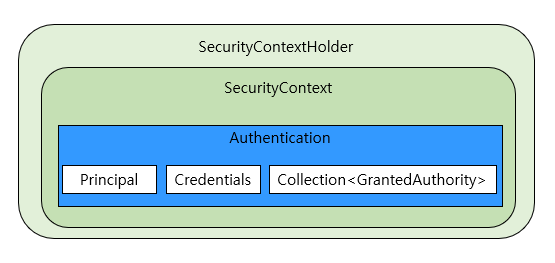
그림에서 SecurityContext가 인증된 Authentication을 포함하고 있다.
이 SecurityContext를 다시 SecurityContextHolder가 포함하고 있다.
SecurityContextHoler가 SecurityXontext를 포함하고 있다는 것은
SecurityContextHolder를 통해 인증된 Authentication을 SecurityContext에 설정할 수 있고,
또한 SecurityContextHolder를 통해 인증된 Authentication 객체에 접근할 수 있다는 것을 의미한다
SecurityContext 클래스
package org.springframework.security.core.context;

import java.io.Serializable;
import org.springframework.security.core.Authentication;

public interface SecurityContext extends Serializable {
    Authentication getAuthentication();

    void setAuthentication(Authentication authentication);
}
SecurityContextHoler 클래스의 코드 일부분
package org.springframework.security.core.context;

import java.lang.reflect.Constructor;
import java.util.function.Supplier;
import org.springframework.util.Assert;
import org.springframework.util.ReflectionUtils;
import org.springframework.util.StringUtils;

public class SecurityContextHolder {
    public static final String MODE_THREADLOCAL = "MODE_THREADLOCAL";
    public static final String MODE_INHERITABLETHREADLOCAL = "MODE_INHERITABLETHREADLOCAL";
    public static final String MODE_GLOBAL = "MODE_GLOBAL";
    private static final String MODE_PRE_INITIALIZED = "MODE_PRE_INITIALIZED";
    public static final String SYSTEM_PROPERTY = "spring.security.strategy";
    private static String strategyName = System.getProperty("spring.security.strategy");
    private static SecurityContextHolderStrategy strategy; // (1)
    private static int initializeCount = 0;

	// (2)
    public static SecurityContext getContext() {
        return strategy.getContext();
    }

    // (3)
    public static void setContext(SecurityContext context) {
        strategy.setContext(context);
    }
}
private static SecurityContextHolderStrategy strategy; // (1)- (1)은 SecurityContextHolder에서 사용하는 전략을 의미한다
SecurityContextHolder 기본 전략은 ThreadLocalSecurityContextHolderStrategy 임
이 전략은 현재 실행 스레드에 SecurityContext 를 연결하기 위해 ThreadLocal을 사용하는 전략이다
	// (2)
    public static SecurityContext getContext() {
        return strategy.getContext();
}- (2)의 getContext() 메서드를 통해서 현재 실행 스레드에서 SecurityContext를 얻을 수 있다
    // (3)
    public static void setContext(SecurityContext context) {
        strategy.setContext(context);
}- (3)의 setContext() 메서드는 현재 실행중인 스레드에 SecurityContext를 연결한다
setContext()는 대부분 인증된 Authentication을 포함한 SecurityContext를 현재 실행 스레드에 연결하는데 사용된다고 함
1. ThreadLocal 기반 동작 원리
- SecurityContextHolder는 내부적으로 ThreadLocal을 사용한다
- 즉, 각 스레드마다 별도의 인증 정보를 독립적으로 저장할 수 있다고 함
- 이를 통해 동시에 여러 요청을 처리할 때 인증 정보가 섞이지 않도록 보장한다.

2. 전략 패턴을 통한 다양한 구현
SecurityContextHolder는 전략 패턴을 사용하여 세가지 모드를 지원하고 있다
| 전략 모드 | 설명 |
| MODE_THREADLOCAL | 기본값임 각 스레드마다 인증 정보를 보관함 |
| MODE_INHERITABLETHREADLOCAL | 자식 스레드도 인증 정보를 상속받게끔 함 |
| MODE_GLOBAL | 모든 스레드가 동일한 인증 정보를 공유하게끔 함 |
실무에서는 대부분 MODE_THREADLOCAL을 사용하여 각 스레드마다 인증정보를 보관하게끔 한다고 한다.
3. 팁
* Web 애플리케이션에서는 요청마다 새로운 스레드가 생성되어 처리되는 경우가 많다고 함
* 따라서 SecurityContextHolder는 기본값인 ThreadLocal 기반 모드만 알아도 충분하다고 함
AbstractAuthenticationProcessingFilter 심화 학습
https://docs.spring.io/spring-security/reference/servlet/authentication/architecture.html#servlet-authentication-abstractprocessingfilter
ProviderManager 심화 학습
AuthenticationProvider 심화 학습
SecurityContextHolder 심화 학습
ThreadLocal 심화 학습
https://www.baeldung.com/java-threadlocal
https://docs.oracle.com/en/java/javase/11/docs/api/java.base/java/lang/ThreadLocal.html
'Spring Boot > Security' 카테고리의 다른 글
| * 인가 아키텍처 : 핵심 컴포넌트 * (0) | 2026.04.29 |
|---|---|
| 인가 아키텍처 : 인가 프로세스 (0) | 2026.04.28 |
| 필터 아키텍처 : 필터 순서와 우선순위 (1) | 2026.04.21 |
| 필터 아키텍처 : 주요 보안 필터 (0) | 2026.03.31 |
| 필터 아키텍처 : Spring Security 필터 구조 (0) | 2026.03.30 |


