XSS(Cross-Site Scripting)
- XSS 공격의 개념, 위험성
- XSS 공격의 주요 유형과 실제 동작 방식
- Security에서 제공하는 XSS 방어 기법
- 기본 응답 헤더 설정을 통해 보안을 강화하는 방법
- Content-Security-Policy(CSP) 활용 실습
XSS(Cross-Site Scripting)
1. 개념
- XSS는 공격자가 악의적인 스크립트를 웹페이지에 삽입하여 사용자의 브라우저에서 실행되도록 하는 공격 기법임
- 주로 쿠키 탈취, 세션 하이재킹, 악성 사이트 리다이렉션, 피싱 등에 활용된다
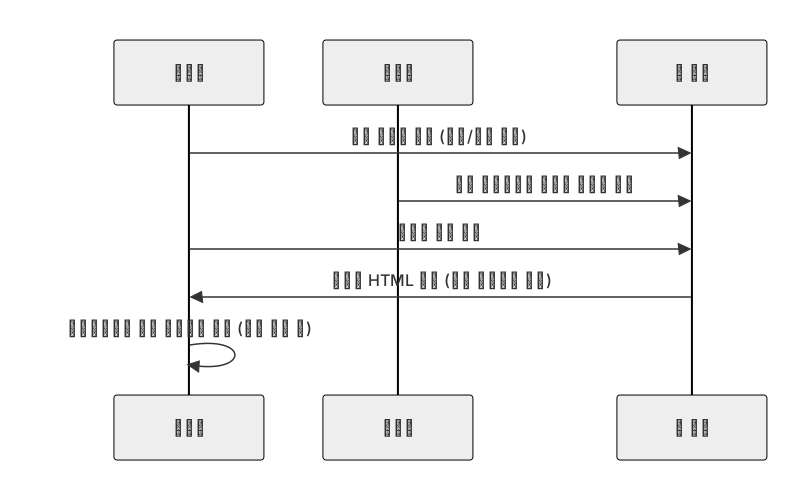
2. XSS 주요 유형
| 유형 | 설명 | 예시 |
| Stored XSS | 서버 DB에 저장된 악성 스크립트가 여러 사용자에게 전달됨 | 게시판 글 내용에 <script>alert('하고픈말')</script> 삽입 |
| Reflected XSS | URL 파라미터에 삽입된 스크립트가 즉시 응답에 반영됨 | http://naver.com/search?q=<script>alert(1)</script> |
| DOM 기반 XSS | 서버 응답과 무관하게 클라이언트 JS 코드가 DOM 조작으로 공격 실행 | JS가 location.hash 값을 그대로 innerHTML 에 삽입함 |
Spring Security의 XSS 방어 접근법
1. 기본 응답 헤더 설정 - CSP와 nosniff
브라우저가 응답 헤더를 근거로 위험한 리소스 / 스크립트를 차단하도록 하는 접근
특히 CSP(Content-Security-Policy)와 X-Content-Type-Options:nosniff 는 현재 XSS 방어에서 가장 많이 사용된다
(X-XSS-Protection은 최신 브라우저에서 사실상 무시되는 레거시 기능이다)
| 헤더 | 역할 | 예시 값 | 비고 |
| Content-Security-Policy | 스크립트 / 리소스 로딩, 실행 원천 제한 | default-src 'self'; script-src 'self' 'nonce-<값>; object-src 'none' |
XSS 방어의 핵심(?) |
| X-Content-Type-Options | MIME 스니핑 방지 -> 잘못된 타입의 리소스 실행 / 렌더링 금지 | nosniff | JSON, 스크립트 오인 실행 방지 |
| Referrer-Policy | 리퍼러 정보 최소화 (부가적 프라이버시) |
strict-origin-when-cross-origin | 선택 |
@Configuration
public class SecurityConfig {
    @Bean
    public SecurityFilterChain defaultChain(HttpSecurity http) throws Exception {
        http
                // XSS
                .headers(headers -> headers
                        .contentTypeOptions(Customizer.withDefaults()) // X-Content-Type-Options: nosniff
                        .contentSecurityPolicy(csp -> csp.policyDirectives(
                                "default-src 'self'; " +
                                "script-src 'self' 'nonce-{{nonce}}' 'strict-dinamic; " +
                                "object-src 'none'; base-url 'self'; frame-ancestors 'none'"))
                        // .xssProtection(x -> x.block(true)) 는 레거시 : 최신 브라우저 대다수 무시
                )
        ;
        return http.build();
    }
* {{nonce}} 는 요청마다 서버가 생성해서 넣는 동적 nonce 값이다

2. Content-Type과 MIME 스니핑 방어하기 (nosniff)
문제 : 서버가 JSON을 text/html 로 잘못 내려주면,
브라우저가 내용을 HTML로 오인(render/sniff)하여 스크립트를 실행할 수 있음
대응 체크리스트
- 컨트롤러에서 정확한 Content-Type 지정하기
- 전역으로 X-Content-Type-Options:nosniff 적용하기 - > 브라우저의 임의 추측 금지
(1) 컨트롤러에서 타입 확정하기 (Content-Type 지정)
package com.b1uffer.customfiltertest.controller;

import org.springframework.http.MediaType;
import org.springframework.web.bind.annotation.GetMapping;
import org.springframework.web.bind.annotation.RestController;

import java.util.Map;

@RestController
public class ApiController {

    @GetMapping(value = "/api/data", produces = MediaType.APPLICATION_JSON_VALUE)
    public Map<String, Object> data() {
        return Map.of("msg", "hello");
    }
}
(2) 사용자 콘텐츠 다운로드시 강제 저장하기
@RestController
public class ApiController {

    @GetMapping("/download")
    public ResponseEntity<byte[]> download() {
        byte[] payload = loadUserFile(); // 잠재적으로 .html
        return ResponseEntity.ok()
                .header(HttpHeaders.CONTENT_DISPOSITION, "attachment; filename=content.bin")
                .contentType(MediaType.APPLICATION_OCTET_STREAM)
                .body(payload);
    }

    private byte[] loadUserFile() {
        try {
            Path path = Path.of("uploads/user-file.bin"); // 저장된 파일의 경로 지정하기
            return Files.readAllBytes(path);
        } catch(IOException e) {
            throw new RuntimeException("파일 로드 실패",e);
        }
    }
}
사용자 업로드 HTML을 같은 출처에서 text/html로 서빙하게 되면 XSS의 위험이 크다
attachment로 내려주거나, 별도의 도메인에서 정적 서빙을 고려해야한다
(3) 전역 nosniff 적용하기 (Spring Security 기본 제공)
                // XSS
                .headers(headers -> headers
                        .contentTypeOptions(Customizer.withDefaults())
                        // X-Content-Type-Options: nosniff, 전역 nosniff 적용
(4) 잘못된 사례와 차단 예시
HTTP/1.1 200 OK
Content-Type: text/html
X-Content-Type-Options: nosniff

{"msg":"<script>alert(1)</script>"}
브라우저는 JSON을 HTML로 추측 렌더링하지 않음 (nosniff) - > 스크립트 실행이 차단됨
Content-Security-Policy(CSP)
1. CSP에 대해서
- 브라우저가 강제하는 보안 정책
어떤 출처(origin)의 리소스만 로드 / 실행 가능한지를 선언적 헤더로 규정한다 - XSS 방어의 최전선 : 스크립트 실행 원천을 제한하고, 인라인 스크립트 금지 또는 허용된 nonce / hash만 실행하게 한다
| 디렉티브 | 의미 | 예시 |
| default-src | 기본 허용 원천 | 'self' |
| script-src | 스크립트 실행 원천 | 'self' 'nonce-<값>' 'strict-dynamic' |
| style-src | CSS 원천 | 'self' (가능하면 unsafe-inline 지양) |
| img-src | 이미지 원천 | * data: |
| object-src | 플러그인 객체 | 'none' |
| base-uri | <base> 태그 제한 | 'self' |
| frame-ancestors | 임베딩 허용 출처 | 'none' 또는 특정 도메인 |
2. nonce vs hash 전략
- nonce : 요청마다 서버가 난수를 생성함 -> <script nonce="<값>"> 에서만 실행을 허용함
- hash : 스크립트 내용의 SHA-256 등 고정 해시가 정책에 등록된 것만 실행을 허용함
| 방식 | 장점 | 단점 | 권장 사용처 |
| nonce | 동적 스크립트에 유연함 | 응답마다 생성 / 주입이 필요 | 서버사이드 렌더링 (Thymeleaf 등) |
| hash | CDN / 정적 스크립트에 적합 | 내용 변경시 해시 갱신 필요 | 빌드 파이프라인 연계 |
3. 서버에서 nonce 생성 & 헤더 주입하기 (실무 예)
(1) thymeleaf 의존성 추가하기
    // thymeleaf
    implementation 'org.springframework.boot:spring-boot-starter-thymeleaf'
(2) CspNonceFilter 클래스
package com.b1uffer.securitymvc.custom;

import jakarta.servlet.FilterChain;
import jakarta.servlet.ServletException;
import jakarta.servlet.http.HttpServletRequest;
import jakarta.servlet.http.HttpServletResponse;
import org.springframework.stereotype.Component;
import org.springframework.web.filter.OncePerRequestFilter;

import java.io.IOException;
import java.security.SecureRandom;
import java.util.Base64;

@Component
public class CspNonceFilter extends OncePerRequestFilter {
    private final SecureRandom random = new SecureRandom();

    @Override
    protected void doFilterInternal(HttpServletRequest request,
                                    HttpServletResponse response,
                                    FilterChain filterChain) throws ServletException, IOException {
        // 요청 전 처리 로직
        byte[] b = new byte[16];
        random.nextBytes(b);

        String nonce = Base64.getUrlEncoder().encodeToString(b);
        request.setAttribute("cspNonce", nonce); // nonce 생성
        // 헤더 주입
        response.setHeader("Content-Security-Policy",
                "default-src 'self'; script-src 'nonce-" + nonce + "' " +
                        "'strict-dynamic'; object-src 'none' base-uri 'self'; frame-ancestors 'none'"
        );

        // 필터체인 진행
        filterChain.doFilter(request, response);
    }
}
(3) API 만들기
import org.springframework.stereotype.Controller;
import org.springframework.web.bind.annotation.GetMapping;

@Controller
public class nonceController {

    @GetMapping("/test")
    public String test() {
        return "example";
    }
}
(4) 정적파일 만들기
<!DOCTYPE html>
<html xmlns:th="http://www.thymeleaf.org">
<head>
    <title>Nonce Test</title>
</head>
<body>
    <script th:attr="nonce=${cspNonce}"> <!-- 이 부분이 바뀜 -->
        console.log('nonce script');
    </script>
</body>
</html>
(5) postman에서 get요청 해보기
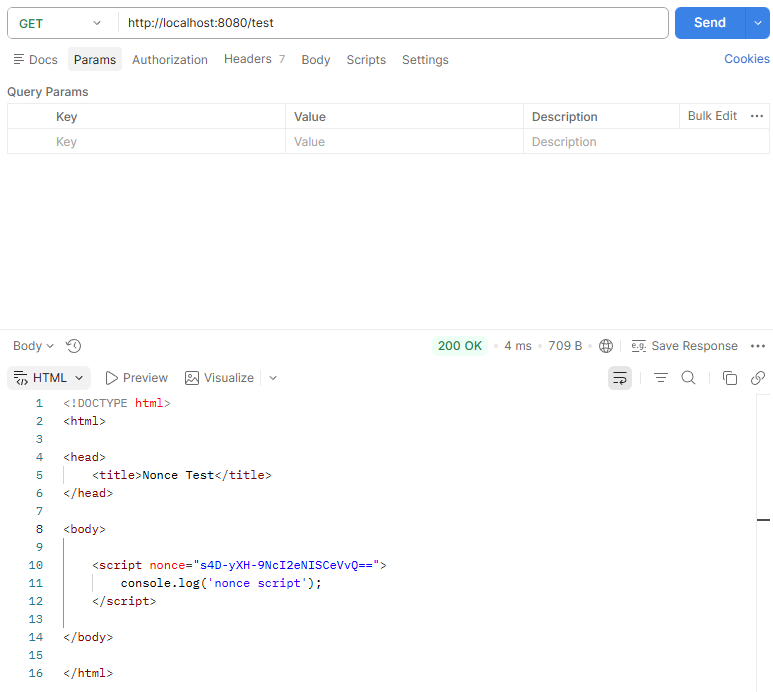
주목해야하는 부분은 이 부분
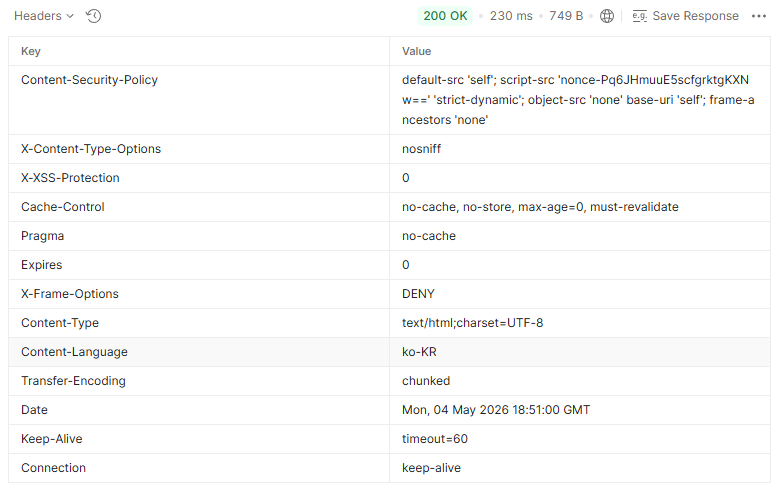
headers에서 Content-Security-Policy가 제대로 나왔는지 봐야한다
다른 SecurityFilter를 타지 않게끔 설정해주는게 필요하다
분리하는 작업을 해야함
default-src 'self';
script-src 'nonce-Pq6JHmuuE5scfgrktgKXNw==' 'strict-dynamic';
object-src 'none' base-uri 'self';
frame-ancestors 'none'
분리는 이런식으로 해준다
내가 만약 전역 Bean 등록을 통해 FilterChain을 돌아가게 만들었다면,
    /**
     * 이 체인을 h2-console 및 특정 uri에서 돌아가지 않게끔 하는 메서드
     * 혹은 @Component를 빼고 SecurityConfig의 원하는 체인에 securityMatcher로 해당 클래스를 넣으면 된다
     */
    @Override
    protected boolean shouldNotFilter(HttpServletRequest request) throws ServletException {
        return request.getRequestURI().startsWith("/h2-console");
    }
해당 메서드를 override하여 설정해줄 수 있다
(6) Spring Security로 간단하게 설정하기 + 동적 nonce 바인딩하기
http.headers(headers -> headers
    .contentSecurityPolicy(csp -> csp.policyDirectives(
    	"default-src 'self'; script-src 'self' 'nonce-'" +
        "{{nonce}}" + "'; object-src 'none'; base-uri 'self'"
        )
    )
);
할만큼 해봤지만, 실습 또 해보기
* 각 필터마다 csrf를 비활성화를 해줘야한다
1. 디렉토리 구조
config/SecurityConfig.java
custom/CspNonceFilter.java
controller/BoardController.java
templates/
- board.html
- write.html
2. BoardController
import org.springframework.stereotype.Controller;
import org.springframework.ui.Model;
import org.springframework.web.bind.annotation.GetMapping;
import org.springframework.web.bind.annotation.PostMapping;
import org.springframework.web.bind.annotation.RequestParam;

import java.util.ArrayList;
import java.util.List;

@Controller
public class BoardController {
    private final List<String> posts = new ArrayList<>();

    @GetMapping("/board")
    public String board(Model model) {
        model.addAttribute("posts", posts);
        return "board";
    }

    @PostMapping("/board")
    public String addPost(@RequestParam String content) {
        posts.add(content);
        return "redirect:/board";
    }
}
3. board.html
<!DOCTYPE html>
<html>
<head>
    <meta charset="UTF-8">
    <title>게시판</title>
</head>
<body>
<h1>게시판</h1>
<form action="/board" method="post">
    <textarea name="content"></textarea>
    <button type="submit">등록</button>
</form>
<ul>
    <th:block th:each="post : ${posts}">
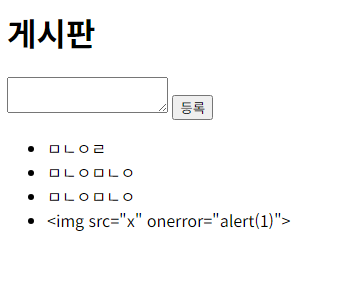
        <li th:text="${post}"></li> <!-- HTML 이스케이프 적용 → 스크립트 실행 차단 -->
    </th:block>
</ul>
<script th:attr="nonce=${cspNonce}">console.log('CSP Nonce working');</script>
</body>
</html>
결과
팁
- 템플릿 엔진 : th:text, c:out 등 자동 이스케이프 속성 사용하기
- JSON 응답 : produces=application/json 명시하기 + nosniff로 오인 방지하기
- 사용자 업로드 컨텐츠 : 동일 출처 text/html 서빙 금지. attachment 또는 별도 도메인을 사용하기
- CSP 정책 수립 : default-src 'self'; object-src 'none'을 기본으로, script-src 는 nonce/hash 전략 사용하기
unsafe-inline 지양하기 - 점진적 도입 : Report-Only로 위반 수집 후 점진적으로 강화하기
정리
| 주제 | 핵심 포인트 |
| 헤더 기반 방어 | CSP와 nosniff가 XSS 1차 방어선 |
| Content-Type 전략 | MIME 스니핑 차단, 정확한 타입 지정, 첨부 다운로드 |
| CSP 실행 제어 | script-src 에 nonce/hash unsafe-inline 지양하기 |
| 템플릿 렌더링 | 출력 이스케이프 필수(th:text 등등..) |
| 운영 팁 | Report-Only로 도입하기, 외부 스크립트는 도메인 명시 + SRI 고려하기 |
'Spring Boot > Security' 카테고리의 다른 글
| CSRF : enable(), disable() (0) | 2026.05.03 |
|---|---|
| 주요 웹 보안 이슈 & Security 방어 전략 : CORS (0) | 2026.05.01 |
| 주요 웹 보안 이슈 & Security 방어 전략 : CSRF (0) | 2026.05.01 |
| 커스텀 필터 구현 : 구현해보기 (0) | 2026.05.01 |
| 커스텀 필터 구현 : 필터체인에 커스텀 필터 추가하기 (0) | 2026.05.01 |


