세션 고정 공격으로부터 Security 설정을 통해 보호하기
- 세션 고정(Session Fixation) 공격의 개념, 위험성
- 공격 시나리오를 통해 왜 방어가 필요한지 알기
- Spring Security 에서 제공하는 세션 고정 보호 전략 이해하기
- 각 전략(none, newSession, migrateSession, changeSessionId) 의 차이와 적합한 사용 시점 알기
- 설정법, 실제 동작 결과 확인하기
세션 고정 공격(Session Fixation)의 이해
1. 개념
공격자가 미리 발급받은 세션 ID를 피해자에게 강제로 사용하게 한 뒤, 해당 세션을 탈취하는 공격 기법
즉, 피해자가 정상적으로 로그인하더라도 이미 공격자가 알고 있는 세션 ID가 그대로 유지된다면 공격자는 세션을 가로챌 수 있다
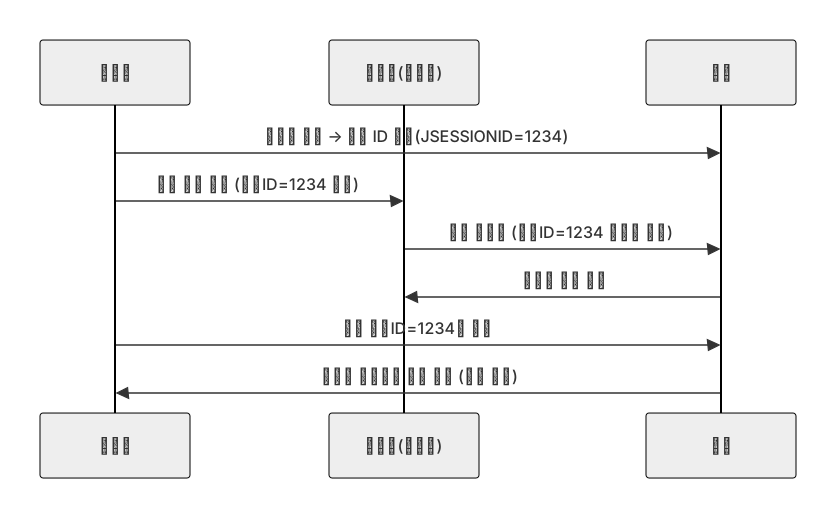
핵심은 로그인 이후에도 세션 ID가 바뀌지 않고 그대로 유지되는 상황이다!!
2. 공격의 위험성
실무에서 자주 고려하는 '사건 재구성' 형태 설명
공격 기법을 알고 방어하는게 중요하다
(1) 피싱 / 유도형 시나리오 (가장 흔함)
- 공격자는 먼저 타깃 애플리케이션에 접속해서 세션 ID(예 : A)를 발급받는다
- 공격자는 피싱 이메일이나 SNS 메시지를 통해 피해자에게 특정 URL을 클릭하도록 유도한다
이 URL은 세션 ID를 포함하거나(앱이 URL을 파라미터로 세션을 받아들이는 경우) 공격자에게 유리한 환경으로 유도함 - 피해자가 링크를 클릭하고 정상적으로 로그인하면, 서버가 세션 ID를 갱신하지 않는 경우 로그인 세션(A)이 그대로 남는다
- 공격자는 이미 알고 있던 A로 접속하여 피해자의 권한을 습득한다
(2) 공용 PC 시나리오
- 피해자가 공용 PC에서 로그인한 뒤 로그아웃을 제대로 하지 않거나(사용자 문제), 세션 무효화가 제대로 되지 않는다면(개발자 문제) 이후 사용자가 같은 세션 ID로 접근할 수 있다
- 공격자는 공용 PC를 통해 이전 세션 정보를 이용하여 권한을 탈취할 수 있다
(3) 세션 ID를 URL에 포함하는 취약한 구현
- 일부 애플리케이션은 세션 ID를 URL 파라미터로 허용하거나, 세션을 URL로 전파하는 기능을 제공하는 경우가 있다
이러한 경우, 세션 ID가 쉽게 노출되므로 위험이 크다
(4) 실제로 관찰되는 지표(운영 시점에서)
- 동일한 세션 ID가 서로 다른 IP 주소(또는 서로 다른 지리적 위치)에서 짧은 시간 내에 사용될 때
- 로그인 직후에도 세션 ID가 변경되지 않을 때(로그인 전후로 세션 ID 비교 로그)
- 특정 계정에서 비정상적으로 많은 세션 생성 또는 동시 접속 기록
Spring Security의 세션 고정 보호 전략
Security에서는 로그인 시점에 세션 ID를 어떻게 다룰지 결정하는 session fixation 보호 전략을 제공한다
                .sessionManagement(session -> session
                        .sessionFixation(fixation -> fixation.migrateSession()) // 기본값
1. 세션 고정 보호 전략 종류

| 전략 | 설명 | 특징 | 권장 사용처 |
| none | 기존 세션 그대로 유지 | 보호 없음 | 테스트 환경, 보안 불필요 서비스 |
| newSession | 새로운 세션을 생성하고 기존 속성은 복사하지 않는다 |
세션 완전 초기화 | 극단적인 보안이 필요한 경우 |
| migrateSession(기본값) | 새로운 세션을 생성하고 속성을 복사함 |
보안 + 사용자 편의 균형 | 일반 웹 서비스 기본 |
| changeSessionId | 세션 ID만 새로 발급, 속성은 그대로 유지함 |
Servlet 3.1+ 환경에서 권장 | 최신 Tomcat / 서블릿 컨테이너 |
세션 고정 보호 적용해보기
1. 프로젝트 구조
yourProject/security/
- config/securityConfig.java
- controller/HomeController.java
java/templates/login.html
2. 의존성
dependencies {
    implementation 'org.springframework.boot:spring-boot-starter-data-jpa'
    implementation 'org.springframework.boot:spring-boot-starter-security' // 이거
    implementation 'org.springframework.boot:spring-boot-starter-thymeleaf' // 이거
    implementation 'org.springframework.boot:spring-boot-starter-web' // 이거
    implementation 'org.thymeleaf.extras:thymeleaf-extras-springsecurity6'
    compileOnly 'org.projectlombok:lombok'
    runtimeOnly 'com.h2database:h2'
    annotationProcessor 'org.projectlombok:lombok'
    testImplementation 'org.springframework.boot:spring-boot-starter-test'
    testImplementation 'org.springframework.security:spring-security-test'
    testCompileOnly 'org.projectlombok:lombok'
    testRuntimeOnly 'org.junit.platform:junit-platform-launcher'
    testAnnotationProcessor 'org.projectlombok:lombok'
}
3. SecurityConfig.java
import org.springframework.boot.autoconfigure.security.servlet.PathRequest;
import org.springframework.context.annotation.Bean;
import org.springframework.context.annotation.Configuration;
import org.springframework.core.annotation.Order;
import org.springframework.security.config.annotation.web.builders.HttpSecurity;
import org.springframework.security.config.annotation.web.configuration.EnableWebSecurity;
import org.springframework.security.config.http.SessionCreationPolicy;
import org.springframework.security.core.session.SessionRegistry;
import org.springframework.security.core.session.SessionRegistryImpl;
import org.springframework.security.web.SecurityFilterChain;

@Configuration
@EnableWebSecurity
public class SecurityConfig {
    // 동시 세션 제어 핵심
    @Bean
    @Order(1)
    public SecurityFilterChain sessionFilterChain(HttpSecurity http) throws Exception {
        http
                .authorizeHttpRequests(auth -> auth
                        .requestMatchers("/login","/session-expired", "/css/**").permitAll()
                        .anyRequest().authenticated()
                )
                .formLogin(form -> form
                        .loginPage("/login")
                        .defaultSuccessUrl("/", true)
                        .permitAll()
                )
                .sessionManagement(session -> session
                        .sessionFixation(fixation -> fixation.migrateSession())
                        .sessionCreationPolicy(SessionCreationPolicy.IF_REQUIRED)
                        .maximumSessions(1)
                        .maxSessionsPreventsLogin(false)
                        .expiredUrl("/session-expired")
                        .sessionRegistry(sessionRegistry())
                );
        return http.build();
    }

    @Bean
    public SessionRegistry sessionRegistry() {
        return new SessionRegistryImpl();
    }

}
HomeController.java
import jakarta.servlet.http.HttpSession;
import org.springframework.security.core.Authentication;
import org.springframework.stereotype.Controller;
import org.springframework.ui.Model;
import org.springframework.web.bind.annotation.GetMapping;

@Controller
public class HomeController {

    @GetMapping("/")
    public String home(Model model, HttpSession session, Authentication auth) {
        // session 에서 id 가져옴
        model.addAttribute("sessionId", session.getId());
        // authentication 에서 name 가져옴
        model.addAttribute("username", auth.getName());
        // session 생성일자
        model.addAttribute("creationTime", session.getCreationTime());
        // session 최근접속시간
        model.addAttribute("lastAccessedTime", session.getLastAccessedTime());
        return "home";
    }

    @GetMapping("/login")
    public String loginPage() {
        return "login";
    }

    @GetMapping("/session-expired")
    public String sessionExpired(Model model) {
        model.addAttribute("msg","세션이 만료되었습니다. 다시 로그인 해주세요.");
        return "session-expired";
    }
}
login.html
<!DOCTYPE html>
<html lang="ko" xmlns:th="<http://www.thymeleaf.org>">
<head>
    <meta charset="UTF-8" />
    <title>로그인</title>
</head>
<body>
<h2>로그인</h2>
<form th:action="@{/login}" method="post">
    <div>
        <label>아이디</label>
        <input type="text" name="username" value="user" />
    </div>
    <div>
        <label>비밀번호</label>
        <input type="password" name="password" value="password" />
    </div>
    <button type="submit">로그인</button>
</form>
</body>
</html>
localhost:8080/login을 통해 로그인하고 세션을 확인한 뒤, 다시 localhost:8080/login으로 로그인하면 세션이 바뀌어있다
바뀌지 않는 것을 보고 싶다면 .sessionFixation(fixation -> fixation.none()) 으로 바꾸면 된다
팁
- 기본값인 migrateSession() 은 대부분의 서비스에서 충분히 안전하다
- Servlet 3.1 이상 환경에서는 changeSessionId() 를 권장한다고 함
- 세션 ID 변경 후에도 필요한 속성(예 : 장바구니 정보 등)이 유지되는지 반드시 확인해야한다
- none() 은 절대로 운영 환경에서 사용하지 않는다
| 전략 | 보안 수준 | 속성 유지 | 특징 |
| none | 매우 낮음 | 그대로 유지함 | 세션 고정 공격에 취약해짐 |
| newSession | 매우 높음 | 유지 안됨 | 사용자의 불편 증가 |
| migrateSession | 높음 | 복사 | 기본값, 실무에 적합 |
| changeSessionId | 높음 | 그대로 유지 | 최신 컨테이너에서 권장 |
'Spring Boot > Security 쿠키,세션 기반 인증,인가' 카테고리의 다른 글
| Remember-Me : 구현 방식 (1) | 2026.05.12 |
|---|---|
| Remember-me : 인증 개념과 필요성 (0) | 2026.05.11 |
| 동시 세션 제어와 세션 고정 보호 : 동시 세션 제어 (0) | 2026.05.10 |
| 세션 관리 설정과 커스터마이징 : 세션 만료 후 처리 전략 (0) | 2026.05.08 |
| 세션 관리 설정과 커스터마이징 : 세션 타임아웃 설정 (0) | 2026.05.08 |


